
Troubleshooting
Most integration problems come down to a few causes: the integration or tool is off, a tool is waiting for your approval, macOS access was denied, or an external server isn't connecting.
Quick Checks
| What you see | What to check |
|---|---|
| Fluent answers without using a tool | The integration is checked in Settings → Integrations and the tool is on in its settings. Name the integration in your request. |
| The reply stops at a tool | Its badge may be waiting for Approve or Reject (⌘A / ⌘R) |
| Calendar, Reminders, Notes or Location can't be reached | macOS access in System Settings → Privacy & Security |
| Browser clicks or YouTube do nothing | Allow JavaScript from Apple Events in your browser, and Default browser in Browser's settings |
| An external integration shows Failed | The error and Logs in its editor |
| An external integration shows Sign-in required | Click Sign In in its editor |
| An action ignores an integration | The action's Use integrations switch and the checkboxes in its sidebar |
First Checks
Use a model that handles tools well. Very small models often skip tools or call them wrongly; try the same request with a larger model to rule this out.
Then test with the smallest request that uses the tool:
- "List my reminder lists"
- "How many files are in my Downloads folder?"
- "Search the web for today's weather in Paris"
A small request shows quickly whether the tool works at all.
Fluent Doesn't Use The Tool
- Name it in the request: "use Reminders to create tasks from this", "use Web Search to compare these products", "use Finder to count the images in this folder".
- Or attach it: type @ and pick the integration or tool, or choose it from the + menu under Integrations.
- Check the tool is on: click the integration in Settings → Integrations and look at its tools.
- In an action, check Use integrations and the integration's checkbox in the editor's sidebar. See Actions.
- When Fluent runs a script with Code, the script can only call tools that don't ask for approval.
Waiting For Approval
A tool that asks for approval waits on its badge with Approve and Reject; press ⌘A or ⌘R. A background or scheduled action waits in a notification, Approval Required.
If a tool should never ask, untick its Ask Before Running on the integration's page.
Permissions
macOS asks for access the first time an integration needs it. Fluent asks to control your browser or Finder only when you use them with Fluent.
| Integration | macOS access |
|---|---|
| Calendar | Calendars |
| Reminders | Reminders |
| Location, and Maps for places near you | Location Services |
| Notes | Automation, for Notes |
| Browser and YouTube | Automation, for your browser |
If you clicked Don't Allow, turn Fluent on in that section of System Settings → Privacy & Security, then try again. See Permissions.
Browser And YouTube
- Both work in the browser picked under Default browser in Browser's settings, which is Safari until you change it. Open the page or video in the front tab there.
- Clicking, typing, running JavaScript and reading YouTube videos need Allow JavaScript from Apple Events:
- Safari: Settings → Advanced → Show features for web developers, then Settings → Developer → Allow JavaScript from Apple Events
- Chrome-style browsers: View → Developer → Allow JavaScript from Apple Events
- Firefox and the browsers built on it can't be controlled, so Browser and YouTube don't work there. Fluent can still attach their front tab as context.
Errors And Follow-Ups
If something fails partway through an answer, Fluent shows the error in the reply instead of leaving it empty. Read it before you try again: it often names the missing key, permission or setting.
Fluent keeps what its tools found earlier in the chat. Ask a follow-up ("now only the ones from March") instead of repeating the whole request.
Local Servers
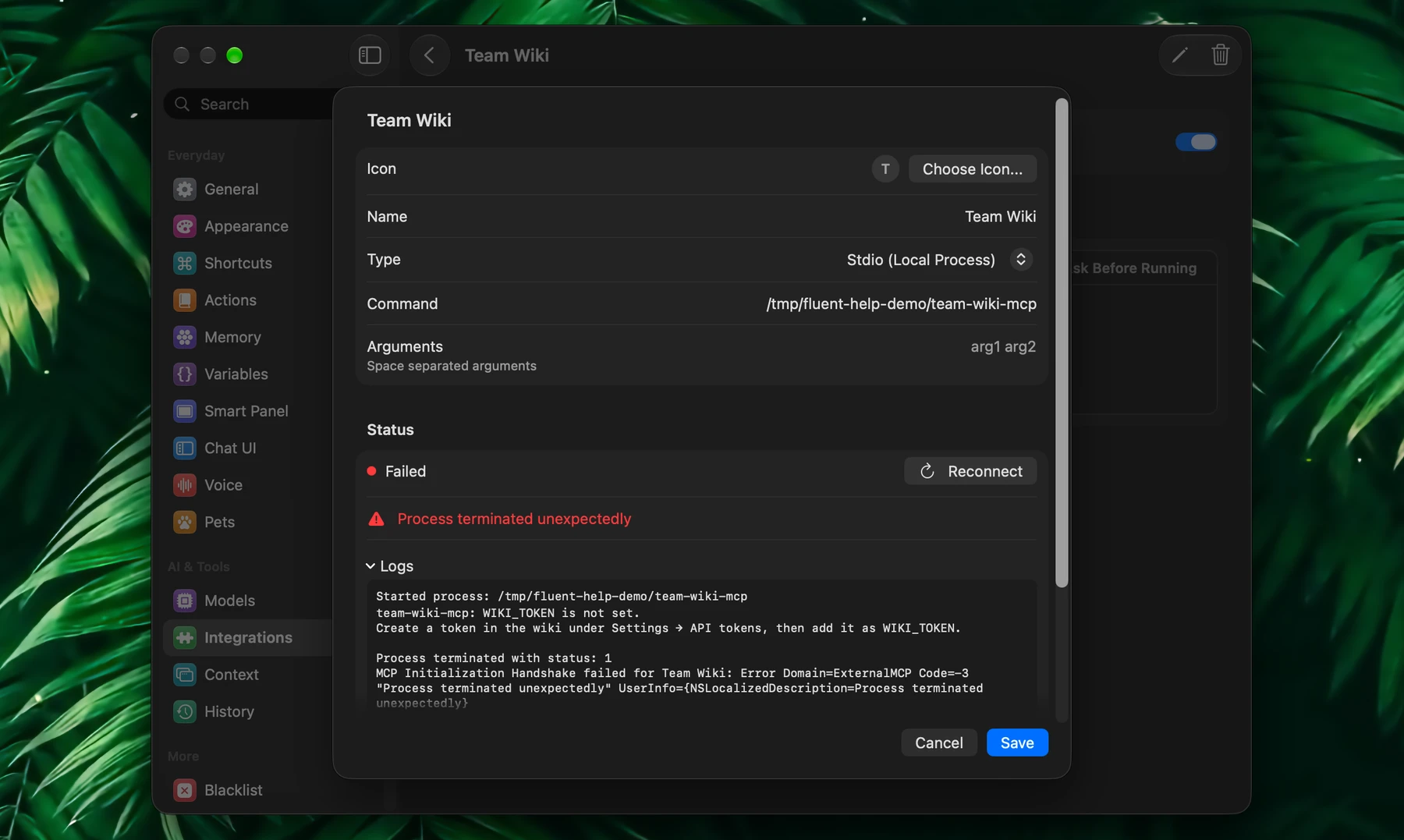
If a local external server doesn't connect, check how it's launched:
- A wrong Command or Arguments
- A missing environment variable, such as an API key
- A missing runtime: the editor offers Install Node.js & npx or Install uv when
npxoruvxisn't found
If the server starts and stops right away, open Logs in the integration's editor: the server's own error is usually in the last lines.
Remote Servers
If the server is remote, check:
- The URL
- That the server is up
- Sign-in required: click Sign In and finish in your browser
- Keys or tokens under HTTP Headers or Environment Variables
- Allow Insecure SSL, only for a trusted local or internal server
OpenAPI (Experimental) is still experimental: use HTTP or SSE when the server offers them.
Connected But No Tools
If an external integration connects but no tools appear under Available Tools, click Reconnect once, then read the status and Logs in its editor. If the tools are there but Fluent doesn't use them, see "Fluent Doesn't Use The Tool" above.
Too Many Tools
If a model picks the wrong tool or behaves inconsistently, give it fewer to choose from. Turn off integrations and tools you don't need, or limit them per action in the action editor.
If MCP Prompt in Settings → Advanced reads Customized and tools started misbehaving, click Edit, then Reset to Default and Save.