
Variables
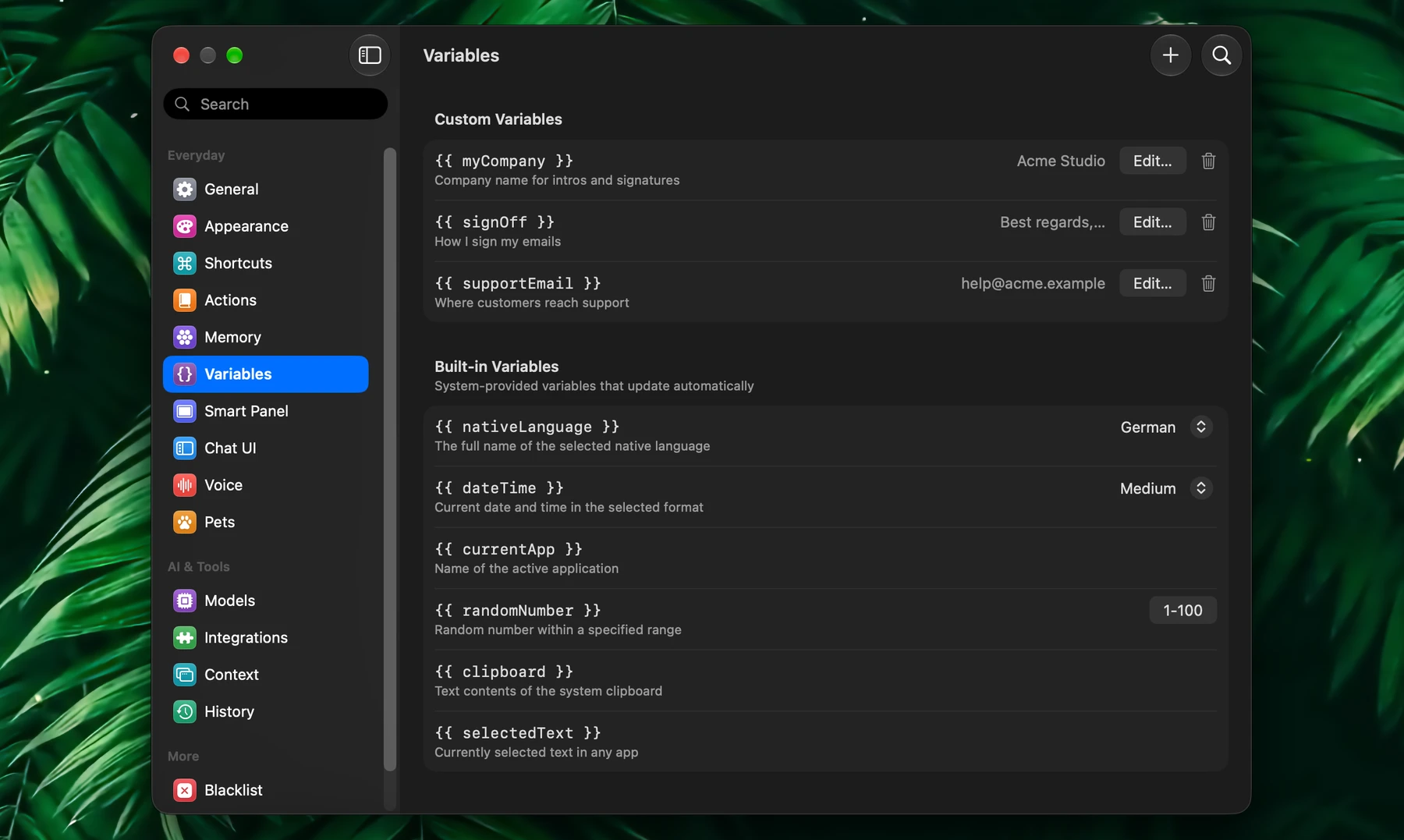
Variables are placeholders Fluent fills in when a prompt runs: your language, today's date, the app you're in, or a value you saved once.
They keep one prompt working in every situation, so you never edit it before running it.
Built-In Variables
| Variable | Becomes |
|---|---|
{{ nativeLanguage }} | The name of your native language, such as German |
{{ dateTime }} | The current date and time, in the format you choose |
{{ currentApp }} | The name of the app you're in |
{{ randomNumber }} | A random number in your range, 1–100 by default |
{{ clipboard }} | The text on your clipboard |
{{ selectedText }} | The text selected in the app you're in |
Adjust them in Settings → Variables, under Built-in Variables:
{{ nativeLanguage }}: choose the language. It's the same setting as Settings → General → Native language, which translation and voice dictation use too.{{ randomNumber }}: click the range, set Minimum and Maximum, and click Apply.{{ dateTime }}: choose a format.
| Format | Example |
|---|---|
| Short | 10/3/26, 2:30 PM |
| Medium (default) | Oct 3, 2026, 2:30:00 PM |
| Long | October 3, 2026 at 2:30:00 PM GMT+2 |
| RFC3339 | 2026-10-03T14:30:00+0200 |
| ISO8601 | 2026-10-03T14:30:00.000+0200 |
Month names follow your native language.
Custom Variables
Save short values you'd otherwise type again and again: a company or product name, a support email, a standard sign-off.
In Settings → Variables, click + (Add Variable) in the toolbar and fill in:
- Variable Name: what you'll write in prompts, such as
myCompany. Use Latin letters, numbers and underscores, with no spaces: Fluent doesn't fill in other names. - Description: a reminder of what it holds
- Value: the text Fluent puts in its place
Then write {{ myCompany }} in any prompt. Click Edit… next to a variable to change it, or the trash to delete it.
Insert
| Where | How |
|---|---|
| Action editor | In the sidebar's Variables section, click a variable or drag it into the prompt. It shows as a tag |
| Smart Panel and chat window | Type @ or click +, and pick a variable. First turn on Variables under Settings → Context → Context Items: it's off by default |
| Any prompt | Type it yourself, such as {{ dateTime }} |
Fluent fills in each variable the moment an action runs or you send the prompt, scheduled runs included. Your prompt keeps the variable, so the value is fresh every time.
Typical uses:
- Translation actions use
{{ nativeLanguage }} - Dated updates and briefings use
{{ dateTime }} - App-aware actions use
{{ currentApp }}
Examples
Translate Into My Language
Translate the input text into {{ nativeLanguage }}.
Preserve formatting and return only the translated text.
Dated Status Update
Today is {{ dateTime }}.
Turn the selected notes into a short project update I can send to the team.
App-Aware Explanation
I am currently in {{ currentApp }}.
Explain the selected text in a way that fits this app context.
Brand-Safe Rewrite
These are custom variables you'd create first.
Rewrite this for {{ productName }}.
The target audience is {{ targetAudience }}.
Keep the tone aligned with {{ brandTone }}.
Clipboard Cleanup
Clean up the following copied text and turn it into neat bullet points:

{{ clipboard }}
Variables Vs Memory
Variables hold short, fixed values. Memory holds longer material Fluent learns and searches: writing samples, documents, profiles and project notes.
| Use | For |
|---|---|
| Variables | Short values that fill a slot in a prompt |
| Context | What's on your screen now |
| Memory | Larger knowledge Fluent learns and brings in when a request needs it |