
Models & Providers
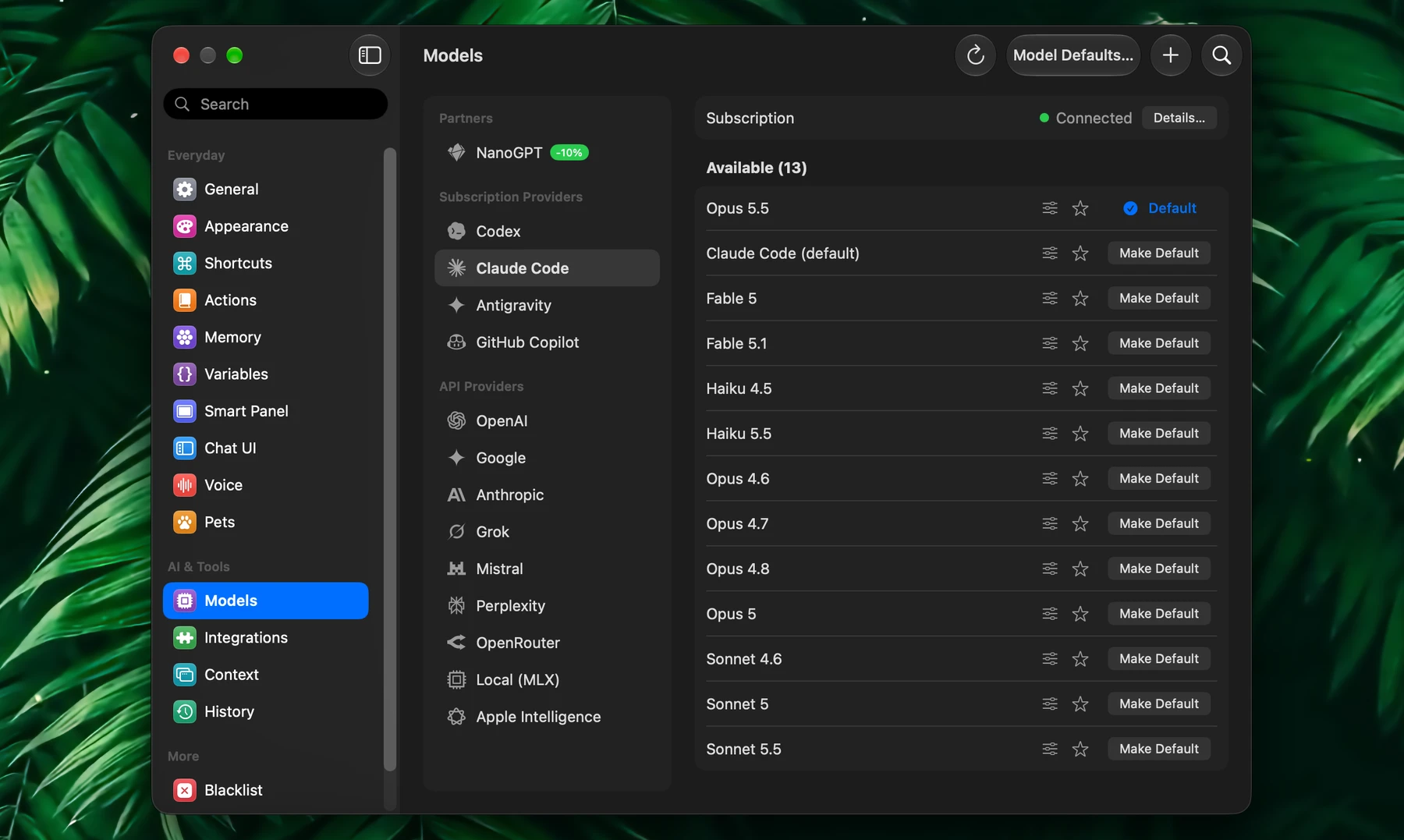
A model is the AI that writes the answer. A provider is the service or app that runs it: a cloud API, an AI subscription you already pay for, your own Mac, or any OpenAI-compatible server.
Set providers up in Settings → Models. You can keep several at once and switch models at any time.
Which Provider To Use
| If you want… | Use |
|---|---|
| The AI plan you already pay for, with no API key | Subscription Providers: Claude Code, Codex, Antigravity, GitHub Copilot |
| One key with hundreds of models, pay as you go | NanoGPT (with a Fluent discount) or OpenRouter |
| A specific model family | OpenAI, Google, Anthropic, Grok, Mistral or Perplexity |
| Privacy and offline use, at no cost per request | Local (MLX) or Apple Intelligence |
| Groq, Cerebras, DeepSeek, Ollama, LM Studio or another OpenAI-compatible service | Custom Providers |
One good default model is enough to start. Add more when a task needs it.
The Models Section
The sidebar of Settings → Models groups providers like this:
| Section | Providers | What you need |
|---|---|---|
| Highlights | Favorites, the models you starred | Shown once you star a model |
| Partners | NanoGPT | An API key |
| Subscription Providers | Claude Code, Codex, Antigravity, GitHub Copilot | A paid plan; you sign in |
| API Providers | OpenAI, Google, Anthropic, Grok, Mistral, Perplexity, OpenRouter | An API key |
| Local (MLX) | A Mac with Apple silicon | |
| Apple Intelligence | macOS 26 with Apple Intelligence turned on | |
| Custom Providers | Any OpenAI-compatible service you add | Its address, and a key if it needs one |
Select a provider to see its models. Use Search models (⌘F) to find one, and Refresh to reload the list.
Cloud Providers
- Open Settings → Models and select the provider.
- Paste your key into Enter API Key and click Save, which checks it first. Get API Key opens the provider's key page, and Change… replaces a saved key.
Once the row says API key valid, the provider's models appear below and in every model menu. API keys are stored in the macOS Keychain.
- OpenRouter lists Free Models and Paid Models separately. Model menus show free models first.
- Anthropic requests use prompt caching, so follow-ups in a long chat cost less.
You can also ask in any chat: "Set up Mistral". Fluent asks for the key under its reply. What you paste there goes straight to the Keychain, never to the model.
Subscription Providers
Use the AI plan you already pay for. There is no API key and no per-token bill: requests count against your plan.
| Provider | Uses your |
|---|---|
| Claude Code | Claude Pro or Max subscription |
| Codex | ChatGPT subscription |
| Antigravity | Google AI Pro or Ultra plan |
| GitHub Copilot | GitHub Copilot subscription |
Each one runs through the provider's official command-line tool. To set one up:
- Open Settings → Models → Subscription Providers and select the provider.
- Click Details… on the Subscription row, then Install CLI. Fluent runs the provider's official installer; you don't need npm or Homebrew. If the tool is already installed, Fluent finds it.
- Click Sign In and approve in your browser. If the page doesn't open, use Open Sign-In Page, Enter Code Manually or Use Terminal Instead.
When the row says Connected, the models your plan includes appear. Details… also shows:
- Usage: how much of each limit you've used and when it resets
- Update CLI: updates the tool and reloads its models
- Sign Out: signs that tool out on this Mac everywhere it's used, your terminal included. Your subscription isn't affected.
All of Fluent's integrations keep working with these models, and tools that ask for approval ask here too. Ask Codex "Summarize the PDFs in my Downloads folder" and it reads them through Fluent's Finder integration.
Sign-in happens in the provider's own tool. Fluent never sees your password or token.
NanoGPT
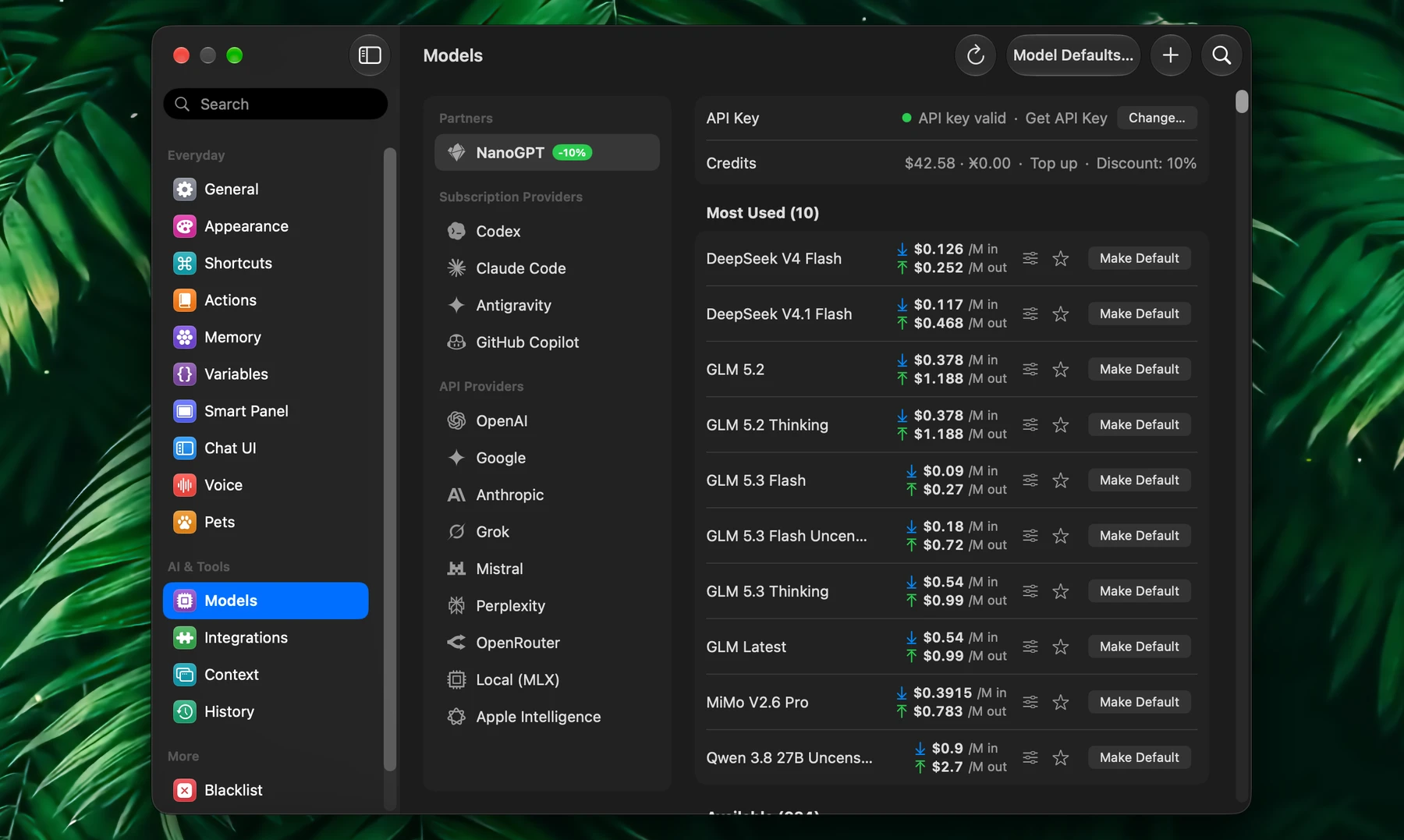
NanoGPT is a privacy-focused AI gateway: one key opens hundreds of models from many providers, and you pay only for what you use.
Fluent is an official NanoGPT partner, so NanoGPT shows more in Fluent than other providers. Find it in Settings → Models → Partners → NanoGPT. Once your key is valid:
- The Credits row under the key shows your balance, a Top up link and your Discount
- Each model's row shows the price per million input and output tokens, with your discount already applied
- Most Used models are listed first
- A shield with a lock marks models that run in a Trusted Execution Environment. Click it to learn more.
- Click the model icon under an answer (Response details) to see what that answer cost
The Fluent Discount
Click Get 10% Discount in the Credits row of Settings → Models → NanoGPT. It needs a Fluent license.
NanoGPT opens, creates a key with a 10% discount on every model you use in Fluent, and hands it back to Fluent. Fluent saves it in Settings → Models → NanoGPT; if a key is already saved, it asks before replacing it.
You need a NanoGPT account. The link disappears once your key has the full discount.
Local Models (MLX)
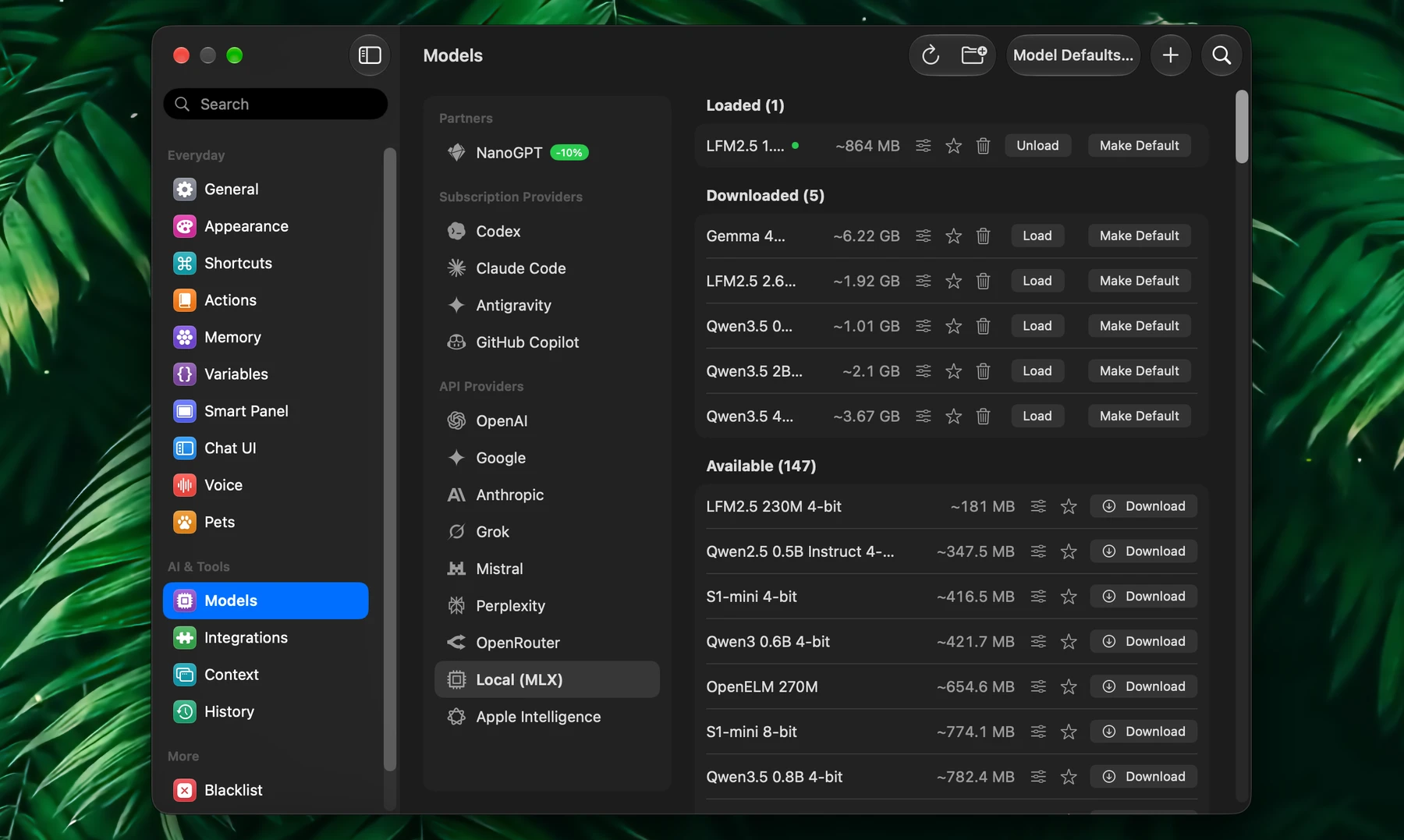
Local (MLX) runs models on your Mac. Nothing leaves your computer, it works offline once a model is downloaded, and there is no cost per request. It needs a Mac with Apple silicon.
- Open Settings → Models → Local (MLX).
- Pick a model under Available and click Download. Models come from Hugging Face.
- Click Load to put it in memory. Only loaded models appear in model menus.
- Optionally click Make Default.
The list has over a hundred models, including Gemma 4, Qwen3.5 and LFM2.5. Each row shows how much memory the model needs: Qwen3.5 2B 4-bit needs about 1 GB, Qwen3.5 9B 4-bit about 5 GB. A 4-bit version needs about half the memory of the 8-bit one. Right-click a model for About, which opens its Hugging Face page.
Loaded models stay loaded after a restart. Click Unload to free the memory, or use Unload All Models in the Fluent menu bar menu. Long chats use less memory: Fluent compresses what the model keeps in memory as the chat grows.
Load From Disk, the folder button in the toolbar, adds a model you downloaded yourself. It must be an MLX model folder with its config.json and weights.
Models are stored in Documents → huggingface → models. If your Desktop & Documents folders sync with iCloud and Optimize Mac Storage is on, macOS can offload the model files; Fluent then shows the model as not downloaded. Download it again, or turn off Optimize Mac Storage.
Prefer Ollama or LM Studio? Add them as custom providers, below.
Apple Intelligence
Apple Intelligence is Apple's on-device model. It needs no API key and no download. It requires macOS 26 on a Mac that supports Apple Intelligence, with it turned on in System Settings → Apple Intelligence & Siri. If it's off, its card in Settings → Models says so.
It's a small model: good for quick rewrites, summaries and short questions. For longer work, use a bigger model.
Until you connect a provider of your own, Fluent answers with Apple Intelligence. Memory also learns your files with it by default (Learning model, the gear in Settings → Memory).
Custom Providers
Any service with an OpenAI-compatible API works as a custom provider.
Ready-Made Connections
These are set up for you, with the right address and logo:
| Needs an API key | Runs on your Mac |
|---|---|
| Cerebras, Groq, DeepSeek, Together AI, Fireworks AI, Moonshot AI, SiliconFlow, Nebius, MiniMax, Alibaba Cloud | Ollama, LM Studio (the key is optional) |
Connect one from the Cloud Models step of the setup guide (Settings → General → Onboarding → Open Onboarding), or ask in a chat: "Set up Groq". For Ollama and LM Studio, start the server in that app and load a model first. Fluent checks the connection and lists the provider under Custom Providers.
Add One Yourself
- Open Settings → Models and click + (Add Custom Provider) in the toolbar.
- Enter a Provider Name and the API Base URL, for example
https://api.example.com/v1. - Paste the API Key, or turn on Optional API key for a local server.
- Optionally choose an Icon (PNG or SVG), then click Done.
Fluent checks the address and loads the provider's model list. To edit or remove a provider, right-click it in the list for Edit… or Delete….
Use structured JSON is off for new custom providers, which avoids empty replies and errors on most services. Turn it on only if your provider supports it.
Model Settings
Each model's row has a configuration button (the sliders icon). To change every model of a provider at once, select the provider and click Model Defaults… in the toolbar.
| Option | What it does |
|---|---|
| Use structured JSON | Asks the model for structured output. Turn it off if replies come back empty or with errors. |
| Use streaming | Shows the answer as it's written. Turn it off if the provider doesn't support streaming. |
| Use tools | Lets the model use integrations |
| Temperature | Lower is more focused, higher is more creative |
| Reasoning | How much the model thinks before it answers. The slider offers the levels this model has, from Off and Minimal up to High, Max or Ultra, plus Auto, which leaves it to the model. New chats start here; change it for one chat with the dots in the prompt (see Smart Panel). |
Reset returns a model to its provider's settings. If a model fails with an error, see Provider Errors.
Default Model
Fluent uses one default model for everything, unless an action or you pick another. Set it in any of these places:
- Settings → General → Default AI Model
- Make Default on a model's card
- Global Model in the Fluent menu bar menu
Until you choose one, Fluent picks a default from what you connect, a subscription first.
To give one action its own model, open the action and choose it under AI Model. A common pattern:
- A fast default for everyday writing
- A stronger model for research actions
- A local model for private notes
Switch Models
In the Smart Panel and the chat window:
| To | Do this |
|---|---|
| Open the model menu | Click the model icon left of the prompt |
| Search all models | Type # and a few letters, for example #opus |
| Cycle models | Press Tab, or Shift-Tab to go back |
Tab cycles through your favorites when the current model is one of them, otherwise through the current provider's models. In the Smart Panel, your pick lasts until the panel closes; then the default model is back.
Menus list only providers that are ready: a saved API key, a subscription you're signed in to, a loaded local model, or Apple Intelligence that's turned on.
Favorites
Click the star on a model's card to make it a favorite. Favorites appear:
- Under Highlights → Favorites in Settings → Models
- At the top of every model menu
- In Tab cycling, when the current model is a favorite
A short list works best: one or two cloud models, one local model, and one for heavy tasks.