
Pet
The pet is a little companion that stands on your desktop with ideas for whatever is on your screen: a shopping list for a recipe, whether a product is worth it, a cover letter for a job posting. Point at it for ideas, or click it and ask anything. It's in beta.
Turn It On
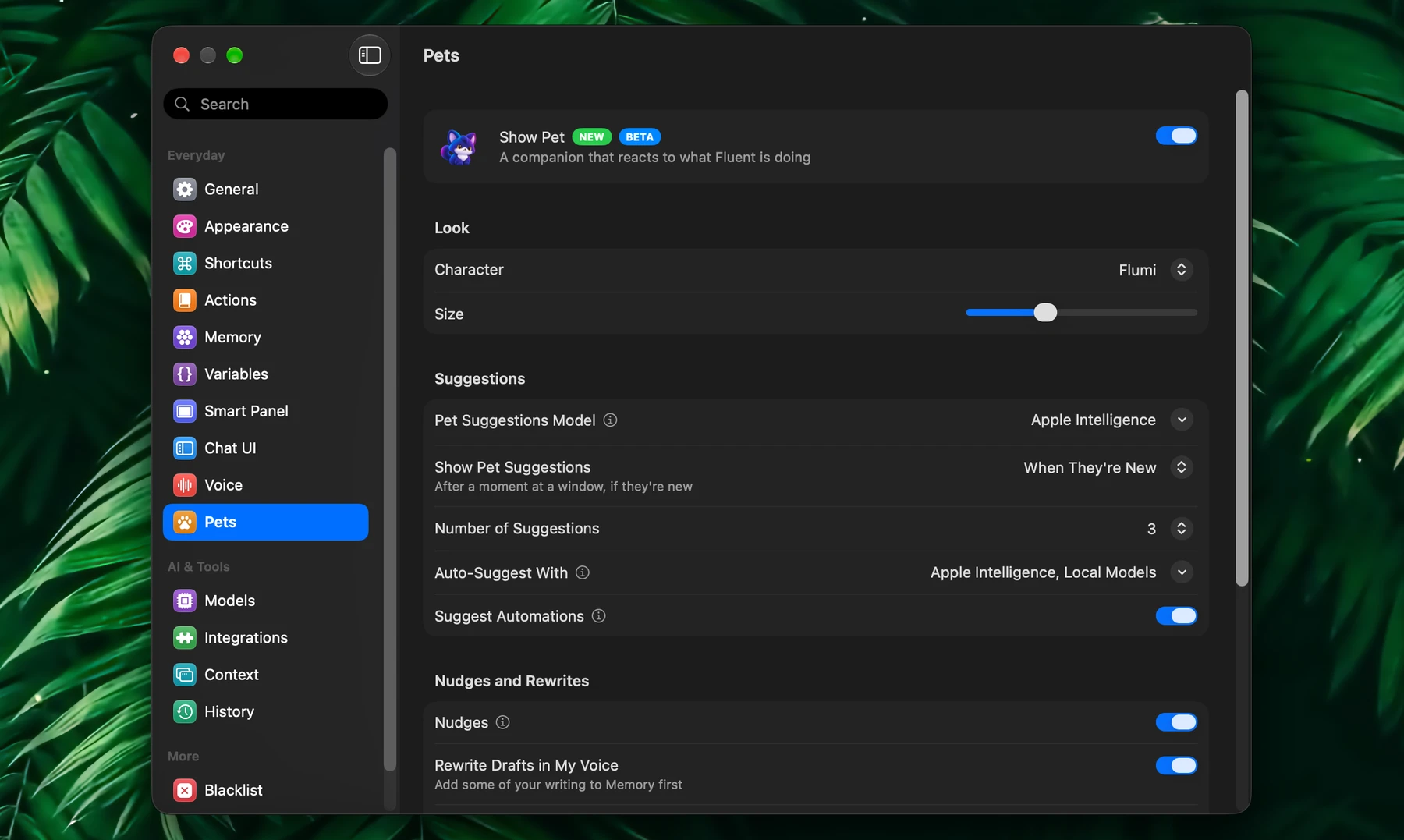
- Open Settings → Pets and turn on Show Pet. The setup guide offers it too, on its Meet Your Pet slide.
- Pick a Character: Flumi by default, or one of ten others. Size makes it smaller or larger.
- Drag the pet wherever you like on your desktop. It stays there, and turns to face the middle of the screen.
Right-click the pet for Hide Pet and Pet Settings….
Ideas For What's On Screen
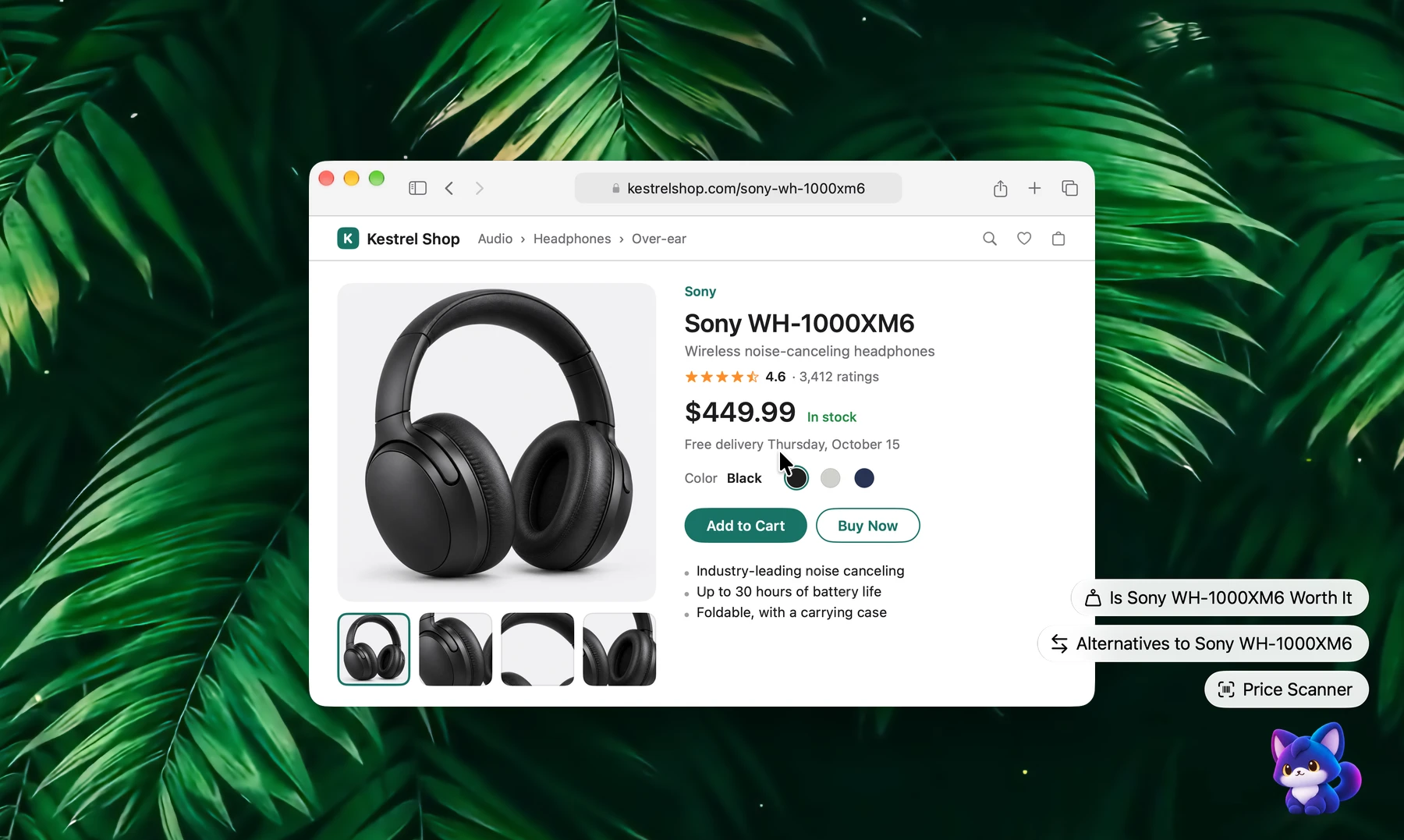
When you come to an app, a page or a folder, the pet reads what the window shows and offers a few ideas as buttons above it. Click one and the pet gets to work; a small bubble says what it's doing, and its answer opens in a window beside it.
| What's on screen | Ideas the pet offers |
|---|---|
| A product in an online shop | Is Sony WH-1000XM6 Worth It, Alternatives to Sony WH-1000XM6, Price Scanner |
| A recipe | Shopping List, Make It for Two, Possible Substitutes |
| A job posting | Check Job Fit, Draft a Cover Letter, Questions to Ask Them |
| An email someone sent you | Reply About its subject, What's Asked of Me, Remind Me About This, Extract Deadlines |
| An article or a news story | Extract Key Points, Explain its subject, What's the Other Side |
| An error message, or code in an editor | Fix This Error, Explain This Code, Find Bugs in This Code |
| A contract or terms of service | Risky Clauses, Extract Deadlines, Explain in Plain Words |
| Your Downloads folder in Finder | Sort Downloads, clearing out installers, finding duplicates |
| Text you're writing, selected | Fix Grammar, Make Concise, Translate |
Ideas come for over sixty kinds of things, from podcasts to pull requests. For a site or app it doesn't know, the pet's model names what you're looking at and writes ideas for it.
When they come up is yours to set in Show Pet Suggestions:
| Option | What happens |
|---|---|
| When They're New (default) | After a moment at a window, all together, and not again at the same window for half an hour unless something new can be done there |
| Right Away | Each time you come to a window |
| When I Point at the Pet | Only when you bring the pointer onto the pet |
Pointing at the pet shows its ideas at any time. Number of Suggestions sets how many it offers, from one to seven.
Ask It Anything
Click the pet and type in the field over its head, then press Return. The field says which model answers.
- Drop something on it: files and folders, selected text, a link or a picture. The pet offers what fits them, with the field to ask about them.
- Talk to it: hold the pet still for a moment and speak, then let go to ask (Hold to Talk, with dictation on in Settings → Voice).
The Pet's Window
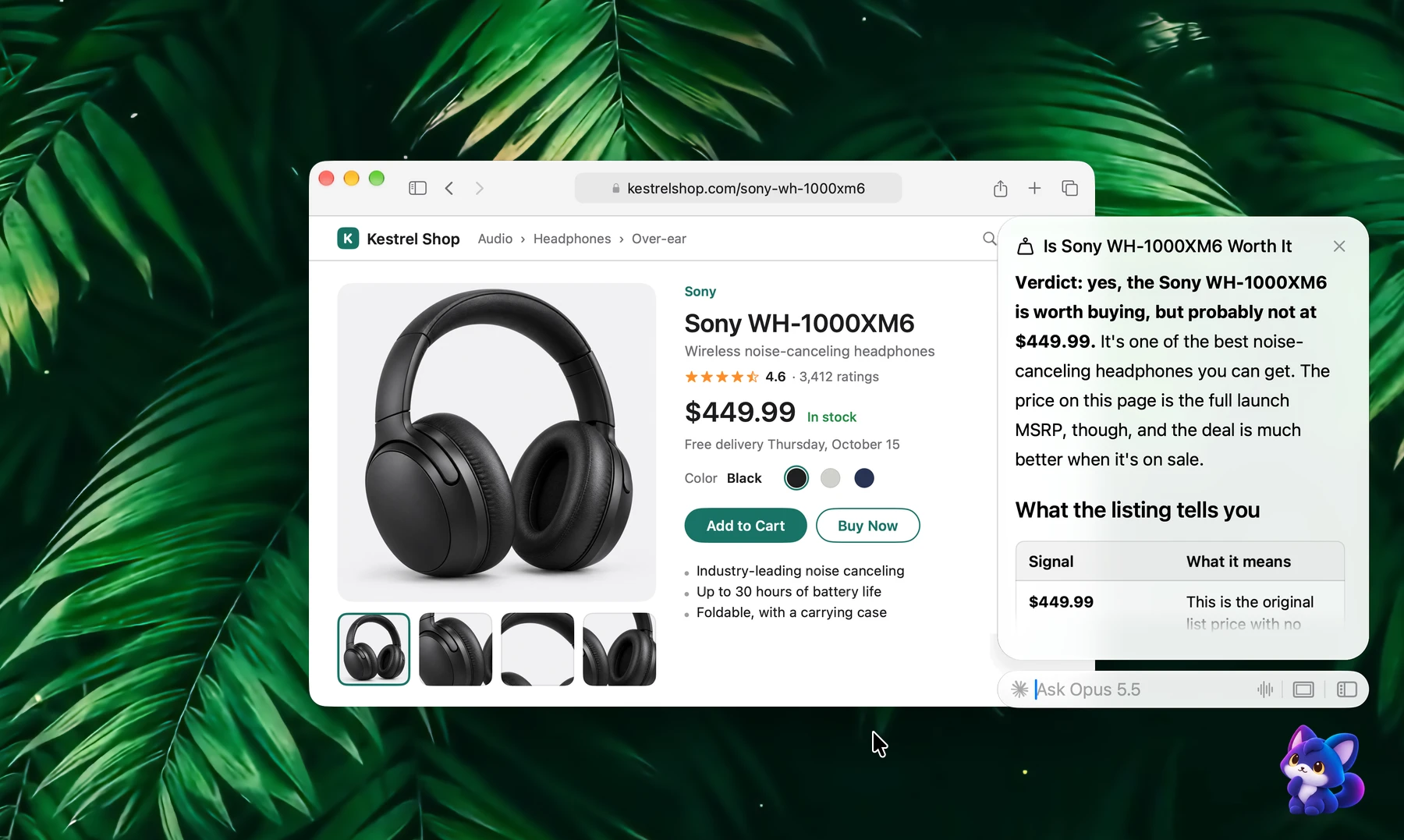
The answer opens in a small window by the pet. Keep asking in its field, or take the conversation further:
| Button | What it does |
|---|---|
| Copy | Copies the answer |
| Insert | Puts the answer into the app you asked in |
| Continue in Smart Panel | Opens the conversation in the Smart Panel |
| Continue in Chat UI | Opens it in the chat window |
Drag the window's corner to make it larger; it keeps its size. Close it and click the pet to bring the conversation back.
The pet asks before a tool that changes something, such as sending a message or moving files: Approve or Reject in its window. With Plan Before Acting on, a request that sends, moves, deletes or takes several steps gets its plan first, and waits for Go Ahead.
Finished Actions
The number on the pet's badge counts Fluent's work that finished while you were busy with something else and that you haven't looked at yet: an action you started with its shortcut or that ran on a schedule, a chat you left to finish. Click the badge to list them, and click one to open its result in the pet's window. With one alone, the badge opens it at once.
Nudges And Rewrites
Nudges keep an eye out as you read mail and chats:
- What's asked of you: the pet can remind you later of what someone asked you to do.
- Dates: it offers to put a meeting or a deadline from a message on your calendar (with the Calendar integration on).
- Codes: it offers to keep a booking reference, a tracking number or a promo code in Memory.
Rewrite Drafts in My Voice: while you write a message, the pet offers a rewrite in your own voice, and Apply puts it in place of your draft. It learns your voice from your writing in Memory: samples of what you wrote, or the My writing style note. A draft that reads well comes back as it is.
Turn either off in Settings → Pets → Nudges and Rewrites. Still Show Nudges and Rewrites decides whether they come up by themselves when ideas wait for you to point at the pet.
Models And Privacy
The pet reads windows and writes its ideas with Apple Intelligence, on your Mac: nothing leaves it. That needs a Mac with Apple silicon and macOS 26, with Apple Intelligence turned on in System Settings.
- Pet Suggestions Model picks another model for its ideas, for a Mac without Apple Intelligence or a language it doesn't read, such as Russian or Ukrainian. With a cloud model, the app's name, the window's title and part of its text go to that model each time it's asked, so a fast one suits it best.
- Auto-Suggest With sets which kinds of model are asked as you move between windows; one left out is asked only when you point at the pet.
- Rewrite With picks a model for rewriting drafts, apart from the one for ideas.
- Without any of these, the pet still offers its built-in ideas for the apps and sites it knows.
What you ask the pet goes to the model that answers, as a Smart Panel request does, and is kept in History.
Pets Settings
| Setting | What it does |
|---|---|
| Show Pet | The pet on your desktop |
| Character, Size | Who stands there, and how large |
| Pet Suggestions Model | The model that writes its ideas (Apple Intelligence by default) |
| Show Pet Suggestions | When ideas come up by themselves |
| Number of Suggestions | One to seven |
| Auto-Suggest With | Which kinds of model are asked ahead |
| Suggest Automations | Offers to put a time from a conversation on your calendar, or to have Fluent do something on a schedule |
| Nudges | Reminders of what chats and emails ask of you, dates, codes |
| Rewrite Drafts in My Voice, Rewrite With | Your drafts rewritten in your voice, and with which model |
| Hold to Talk | Hold the pet and speak |
| Plan Before Acting | A plan first, before anything that sends, moves or deletes |
| Show on Lock Screen | The sleeping pet and the number of finished actions while your Mac is locked |
Good To Know (Beta)
- Ideas written by Apple Intelligence are plainer than a large cloud model's, and it sometimes takes a page for something else. When the Mac is short on memory, it can stay quiet for a few minutes.
- The pet reads windows through Accessibility. An app that hides its text from it gets the pet's built-in ideas only.
- Nudges were tuned on Gmail, Apple Mail, Discord and Slack. In Apple Mail's main window, the pet reads the email that was open when you came to Mail.
- A rewrite needs a draft of at least five words. Apply pastes plain text, so bold and links inside the draft are lost.
- Show on Lock Screen uses parts of macOS that Apple doesn't document, and may stop working after a macOS update.